
From WhatsApp to ValleyRAT: a hijacked contact, a signed Citrix binary and admin rights in under a minute
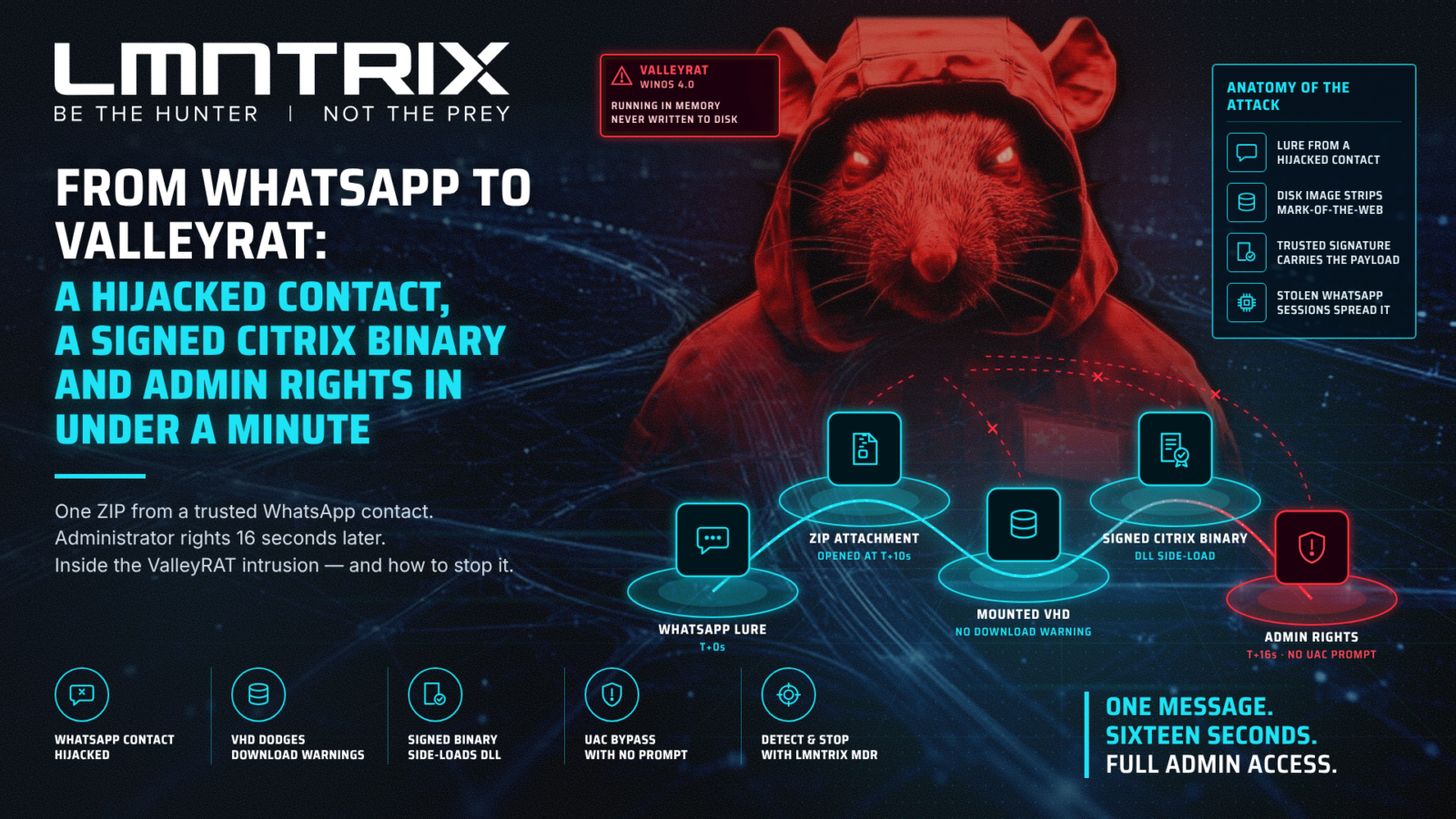
A single ZIP file sent over WhatsApp by a trusted business contact gave attackers administrator rights on a corporate laptop 16 seconds after it arrived. The LMNTRIX Cyber Defense Centre investigated the intrusion, recovered the payload from memory and identified it as ValleyRAT (also known as Winos 4.0). This post walks through the chain, the indicators and how to stop it.
Key takeaways
- Messaging apps are the new email attachment. The lure came from a real business contact whose WhatsApp account had been hijacked, so it bypassed every email security control.
- Disk images defeat download warnings. The ZIP held a VHD virtual disk. Files inside a mounted disk image lose Windows’ “downloaded from the internet” mark, so no SmartScreen or Office warning fired.
- A trusted signature carried the payload. A genuine, validly signed 2017 Citrix Receiver binary was renamed and used to side-load a malicious DLL.
- Admin rights without a prompt. The malware used the CMSTPLUA COM interface to bypass User Account Control, then tried 987 times to load a vulnerable kernel driver to kill security tools. Windows blocked every attempt.
- It spreads by stealing WhatsApp sessions. The in-memory payload, ValleyRAT (Winos 4.0), reads WhatsApp Desktop and WhatsApp Web session data, which is how one hijacked account becomes the next lure.
How the attack unfolded
The whole chain, from message to persistence, ran in under a minute and needed only one decision by the user: opening the file.
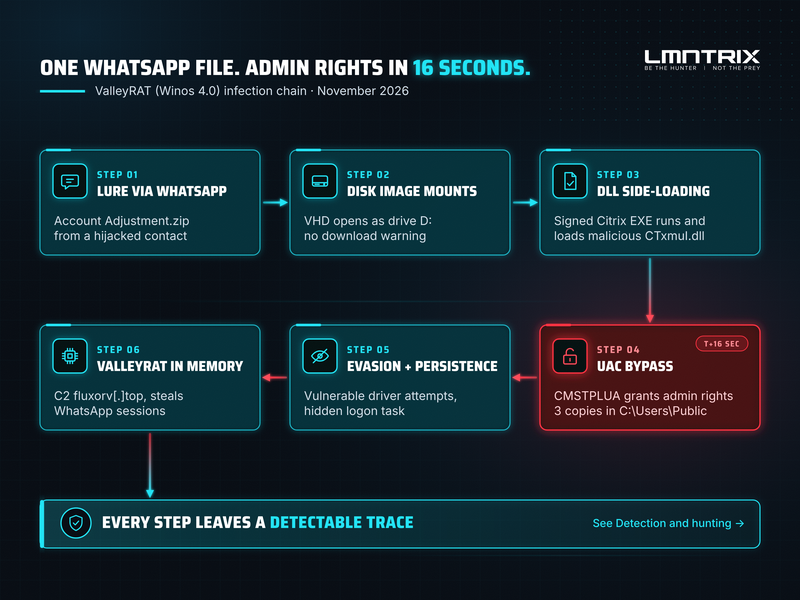
Step 4 is where the attacker gained full control of the machine, and where the strongest detection signal sits.
Technical analysis
Delivery: a ZIP from a hijacked contact
The victim received Account Adjustment.zip (3.8 MB) in WhatsApp Desktop from a business contact who later confirmed their account had been hacked. The user opened it ten seconds later. Inside was a single virtual disk, 11101507452026_5DFABCA2.vhd. Double-clicking it in File Explorer mounted it as a new drive letter (D:).
The file names are machine-generated: both the disk image and the executable inside it encode the same date and time, “11-10 15:07:45”. That points to an automated kit stamping each build, not a lure crafted for one victim.
Execution: a signed Citrix binary side-loads the payload
The drive contained B1110150745.exe, a genuine Citrix Receiver component (original name MIGRATEN.EXE, version 14.4.4000.10, validly signed in 2017). Beside it sat a malicious CTxmuI.dll. The Citrix program loads a DLL of that name from its own folder, so running the signed executable ran the attacker’s code.
The user ran the file three times in six seconds, the typical pattern of someone waiting for a “document” to open. Each run:
- Copied the Citrix binary and the DLL into a new folder under C:\Users\Public with a random name made of punctuation characters, starting ~6_ or ~3_ and ending in a short suffix such as .afM_.
- Renamed the binary to look like a common component: parent-ipc-core-x86.exe, minibrowser_shell.exe or tensorflowlite_c.exe.
- Relaunched the copy with full administrator rights through the CMSTPLUA (ICMLuaUtil) elevated COM interface, a well-documented UAC bypass that shows no prompt. Each copy was started in a suspended state.
The elevated process then ran the DLL through rundll32.exe using the export NvIGOUtil, a name chosen to resemble an NVIDIA component. To relaunch itself, it also copied cmd.exe and rundll32.exe into the user’s Temp folder under random 32-character names and as dllhost.exe.
Defence evasion: a vulnerable driver, blocked
Within 17 seconds of execution the malware began trying to load RCFlCtrl.sys (“RedCastle Control Driver”), a known vulnerable driver that can be abused to terminate any process, including security software. It retried 987 times, roughly every 6.5 seconds, for 1 hour 45 minutes. Windows code integrity and the vulnerable driver blocklist stopped every attempt, and the endpoint security stack kept running.
Persistence
Twenty-six seconds after first execution, the malware registered a hidden scheduled task, \parent-ipc-core-x86, that relaunches the loader at every logon. It used the Task Scheduler API directly rather than schtasks.exe, so no command line revealed it.
The payload: ValleyRAT in memory
LMNTRIX captured memory from the running loader and analysed it offline:
- The DLL names itself NvDriverDiagnostics.dll internally and was compiled about three hours before delivery. Its next stage sits in an encrypted section named .成功0 (“success”).
- A second stage, 登录模块.dll (“login module”), was loaded straight into memory and never written to disk. The module name and its configuration format identify the ValleyRAT / Winos 4.0 framework.
- The configuration names the command-and-control server fluxorv[.]top on TCP 443, 80 and 9999, with build stamp 2026.11.10.
- The module can detect installed antivirus and analysis tools, log keystrokes, add Run-key persistence, look up the victim’s public IP and location (api.ipify.org, ip-api.com with Chinese-language output), and read WhatsApp Desktop and WhatsApp Web session data from Chrome and Edge.
That last capability explains how the campaign spreads: each stolen WhatsApp session becomes a trusted sender for the next wave of lures.
MITRE ATT&CK mapping
| Tactic | Technique | How it was used |
| Initial Access | T1566.003 Phishing: Spearphishing via Service | ZIP sent over WhatsApp from a hijacked contact |
| Execution | T1204.002 User Execution: Malicious File | User ran the executable from the mounted VHD |
| Defense Evasion | T1553.005 Subvert Trust Controls: Mark-of-the-Web Bypass | VHD container stripped the internet download mark |
| Defense Evasion | T1574 Hijack Execution Flow: DLL side-loading | Signed Citrix binary loaded the malicious CTxmuI.dll |
| Privilege Escalation | T1548.002 Abuse Elevation Control Mechanism: Bypass UAC | CMSTPLUA (ICMLuaUtil) COM interface |
| Defense Evasion | T1218.011 System Binary Proxy Execution: Rundll32 | DLL run through rundll32.exe, export NvIGOUtil |
| Defense Evasion | T1036.003 / T1036.005 Masquerading | Renamed cmd.exe and rundll32.exe in Temp; loader copies named after common components |
| Defense Evasion | T1562.001 Impair Defenses: Disable or Modify Tools | 987 attempts to load the vulnerable RCFlCtrl.sys driver (blocked) |
| Persistence | T1053.005 Scheduled Task/Job: Scheduled Task | Hidden task \parent-ipc-core-x86 at logon |
| Defense Evasion | T1620 Reflective Code Loading | Second-stage login module loaded only in memory |
| Discovery | T1614 System Location Discovery | Public IP and geolocation lookups |
| Credential Access | T1539 Steal Web Session Cookie | WhatsApp Desktop and WhatsApp Web session data |
| Command and Control | T1071.001 Application Layer Protocol: Web Protocols | fluxorv[.]top on TCP 443 and 80 |
Indicators of compromise
Block the delivery, payload and network indicators. The Citrix, cmd.exe and rundll32.exe hashes belong to legitimate signed files: alert on them only when they run from C:\Users\Public, a Temp folder or a mounted disk image.
| Indicator | Type | Context |
| fb24580a6c3ddf5b640fc3a3fca0f3f5a8306c314c16f41331103ed44032c365 | SHA256 | Account Adjustment.zip (delivery archive) |
| 97335eb77df1b40aa2b9fee63fb9bd3c41c6209013ac73b046d88de527e49f02 | SHA256 | 11101507452026_5DFABCA2.vhd (disk image) |
| b3f115c4b9d7d1fcde230965f3d2e0dca98346f20bda10ac1f854216d3af91ae | SHA256 | 登录模块.dll, in-memory second stage |
| fluxorv[.]top | Domain | C2, TCP 443, 80 and 9999 |
| 2aadd71ae5732f8cec32191b8592226e5e77bb7d60581580be32ffc718573d1f | SHA256 | Signed Citrix MIGRATEN.EXE abused as loader (legitimate file) |
| 7a91bee028b7db8d24a406115c973a3d05e8403d8dda50293a802f5e7610ae97 | Authenticode SHA256 | RCFlCtrl.sys vulnerable driver (signer SGA Solutions Co.,Ltd., certificate expired 2020) |
| CTxmuI.dll with export NvIGOUtil | File / export | Malicious side-loaded DLL |
| C:\Users\Public\~6_* and C:\Users\Public\~3_* | Folder pattern | Loader staging folders |
| parent-ipc-core-x86.exe, minibrowser_shell.exe, tensorflowlite_c.exe | File names | Renamed loader copies |
| \parent-ipc-core-x86 | Scheduled task | Persistence at logon |
| RCFlCtrl | Service name | Vulnerable driver service |
Detection and hunting
Each stage of this chain leaves a behaviour that is rare in normal business use. Hunt for these in your EDR or SIEM:
| Behaviour | What to look for |
| Disk image delivered by a messaging app | A .vhd, .vhdx, .iso or .img file written by WhatsApp, Telegram or another messaging client, then mounted by File Explorer |
| Execution from a mounted disk | A process started by explorer.exe from a drive letter that appeared seconds earlier |
| Signed binary in the wrong place | A process whose original file name or signer (for example Citrix) does not match its path, especially under C:\Users\Public |
| UAC bypass through CMSTPLUA | A child process of dllhost.exe /Processid:{3E5FC7F9-9A51-4367-9063-A120244FBEC7} or {D2E7041B-2927-42FB-8E9F-7CE93B6DC937} running at high integrity |
| Punctuation-only folder names | New folders under C:\Users\Public whose names start with ~ and consist mostly of symbols |
| Rundll32 proxy execution | rundll32.exe loading a DLL from a user-writable folder, or a copy of rundll32.exe or cmd.exe running from Temp under another name |
| Vulnerable driver loading | Repeated creation of a kernel driver service with a random name, or code-integrity block events for RCFlCtrl.sys |
| Hidden logon task | A scheduled task whose action points to C:\Users\Public or Temp |
| Location lookups by unusual processes | DNS requests for api.ipify.org, api.ip.sb, icanhazip.com, ipinfo.io or ip-api.com from processes that are not browsers or known agents |
The UAC bypass alone is a high-fidelity signal: very little legitimate software launches a program from a user-writable folder through the CMSTPLUA broker.
How to defend
- Stop users mounting disk images. Block standard users from mounting VHD, VHDX, ISO and IMG files through Group Policy or Intune. This removes the delivery trick used here.
- Remove everyday admin rights. The UAC bypass only works for accounts that are local administrators. Give users a standard account and a separate admin account when needed.
- Set UAC to “Always notify”. It blocks the silent auto-elevation that CMSTPLUA relies on.
- Keep the vulnerable driver blocklist on. Microsoft’s blocklist and memory integrity (HVCI) stopped the driver attack in this case.
- Control execution from user-writable folders. Use App Control for Business (WDAC) or AppLocker to block programs running from C:\Users\Public, Temp and messaging-app download folders.
- Treat messaging apps as an attack surface. Decide whether WhatsApp Desktop is allowed on corporate devices, and train staff that a file from a known contact is not proof it is safe.
- If someone is hit, assume the WhatsApp session is gone. On the phone, open WhatsApp > Linked devices and log out every device, turn on two-step verification, and warn contacts before the account is used against them.
Further reading
- Check Point Research, Cracking ValleyRAT: from builder secrets to kernel rootkits
- The Hacker News, Silver Fox APT uses Winos 4.0 malware
- MITRE ATT&CK, T1548.002 Bypass User Account Control
- hfiref0x, UACME: UAC bypass techniques reference
This analysis is based on an incident investigated by the LMNTRIX Cyber Defense Centre.